> ## Documentation Index
> Fetch the complete documentation index at: https://docs.droidoxy.com/llms.txt
> Use this file to discover all available pages before exploring further.
# OGAds Offerwall Integration
> Seamlessly integrate OGAds Offerwall into your Pocket Script application
## Getting Started
You can purchase the add-on from our official website : [Get OGADS \[Add-on\]](https://www.droidoxy.com/item/ogads-offerwall/)
 ### Add-on Installation
1. Go to `yourdomain.com/cpanel`
2. Enter your **username** and **password**
Alternatively, you can use an FTP client as well.
Locate the `addon-ogads-offerwall.zip` file from the downloaded package
* Upload the contents of `addon-ogads-offerwall.zip` inside the `admin -> addons` folder
Open your web browser and navigate to your Pocket Script admin dashboard.
* You'll be shown an alert to activate the addon
* Click the Activate Button on the alert to activate the addon
* Once Activated, navigate to Offerwalls Section on the Admin sidebar and click on edit OGAds Offerwall
### Pre-requirements
To Intergrate OGAds offerwall, you'll need the following:
1. OGAds Account
* Create An [OGAds Account](https://members.ogads.com/login)
2. OfferwallInc Account
* Create An [OfferwallInc Account](https://offerwallinc.com/dashboard/)
As Ogads does not have an offerwall, we are using offerwallinc.com mediation technology to integrate ogads offers
3. Postback URL for OGAds Network
* Login to Admin Interface (Pocket Script instance)
* Navigate to `Offerwalls -> All Offerwalls` on the admin sidebar
* Click on `Edit OGAds Offerwall`
* Scroll down to Postback URL Section and copy the OGAds Postback URL
### Getting OGADS Ids
To Intergrate OGADS offerwall, you’ll need the following Ids from OGADS :
* Affiliate Id
* Offers API KEY
Please follow the below steps to get the required Ids
1. Login into your ***OGADS Dashboard***
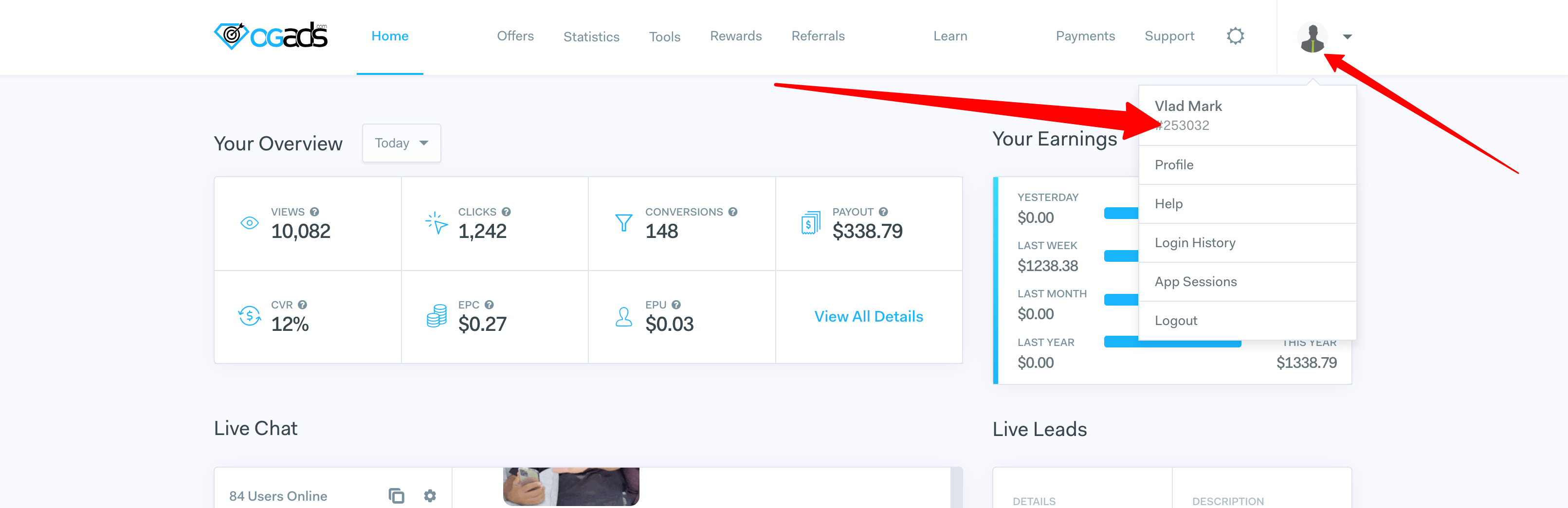
2. Click on account drop-down menu to copy the `Affiliate Id`
### Add-on Installation
1. Go to `yourdomain.com/cpanel`
2. Enter your **username** and **password**
Alternatively, you can use an FTP client as well.
Locate the `addon-ogads-offerwall.zip` file from the downloaded package
* Upload the contents of `addon-ogads-offerwall.zip` inside the `admin -> addons` folder
Open your web browser and navigate to your Pocket Script admin dashboard.
* You'll be shown an alert to activate the addon
* Click the Activate Button on the alert to activate the addon
* Once Activated, navigate to Offerwalls Section on the Admin sidebar and click on edit OGAds Offerwall
### Pre-requirements
To Intergrate OGAds offerwall, you'll need the following:
1. OGAds Account
* Create An [OGAds Account](https://members.ogads.com/login)
2. OfferwallInc Account
* Create An [OfferwallInc Account](https://offerwallinc.com/dashboard/)
As Ogads does not have an offerwall, we are using offerwallinc.com mediation technology to integrate ogads offers
3. Postback URL for OGAds Network
* Login to Admin Interface (Pocket Script instance)
* Navigate to `Offerwalls -> All Offerwalls` on the admin sidebar
* Click on `Edit OGAds Offerwall`
* Scroll down to Postback URL Section and copy the OGAds Postback URL
### Getting OGADS Ids
To Intergrate OGADS offerwall, you’ll need the following Ids from OGADS :
* Affiliate Id
* Offers API KEY
Please follow the below steps to get the required Ids
1. Login into your ***OGADS Dashboard***
2. Click on account drop-down menu to copy the `Affiliate Id`
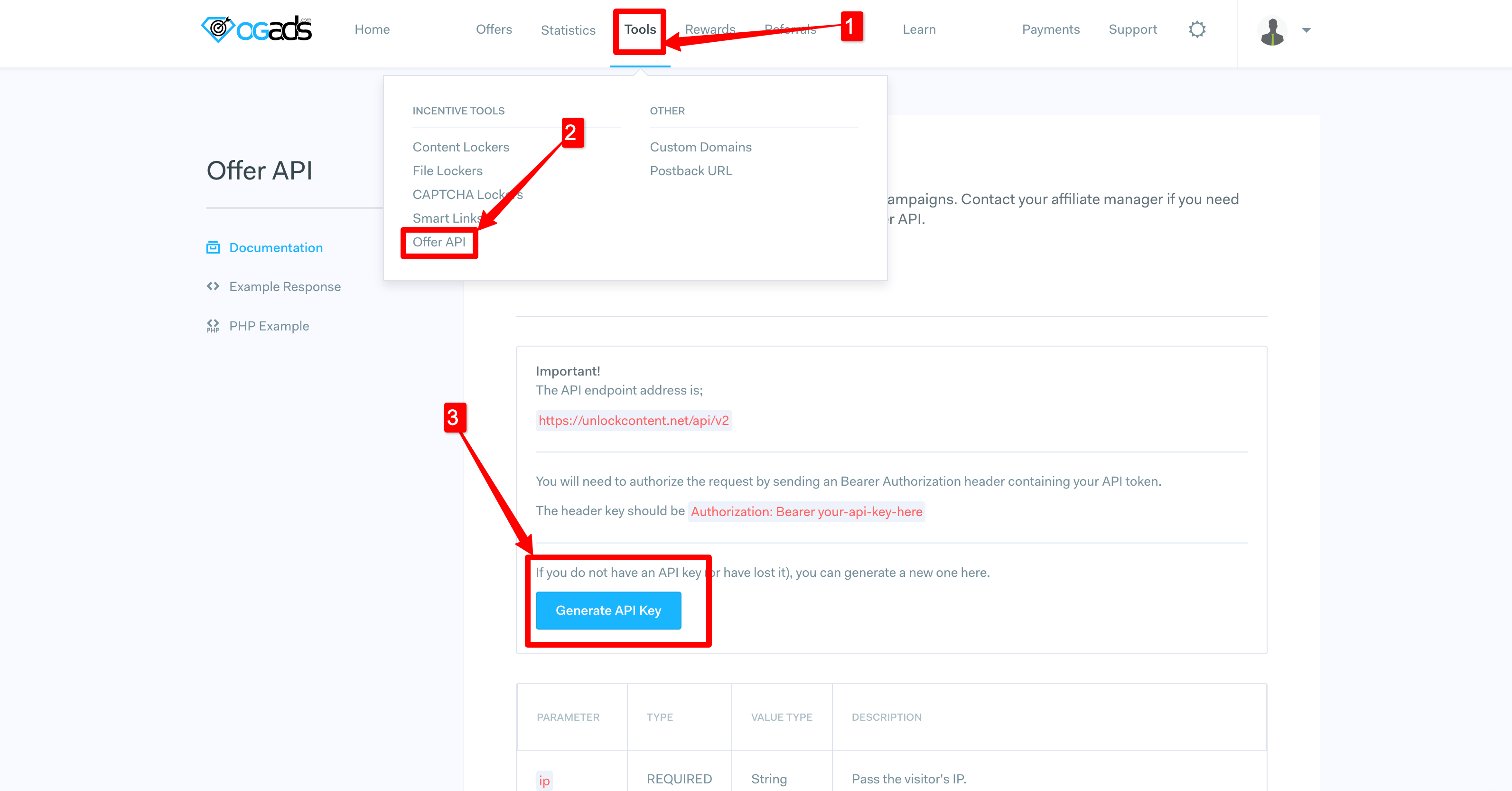
 3. Navigate to `Tools --> Offers API` from top menu and click on `Generate API Key`
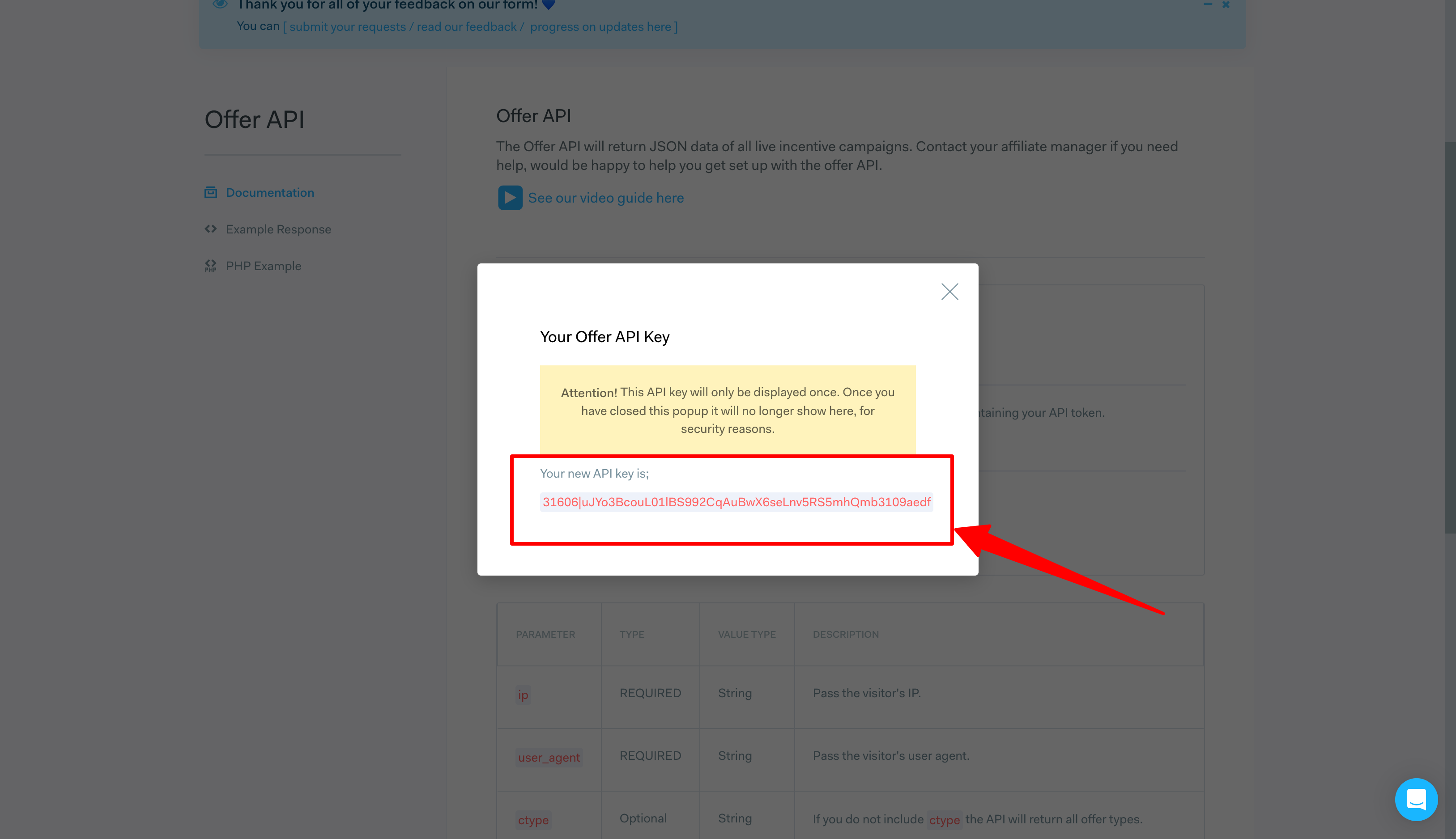
 4. Finally, Copy the `API KEY`
 ### Getting OfferwallInc Ids
To Intergrate OGADS offerwall, you’ll need the following Ids from OfferwallInc :
* Wall Id
* Points Ratio
As Ogads does not have an offerwall, we are using offerwallinc.com mediation technology to integrate ogads offers
Please follow the below steps to get the required Ids
1. Login into your ***[OfferwallInc Dashboard](https://offerwallinc.com/dashboard/)***
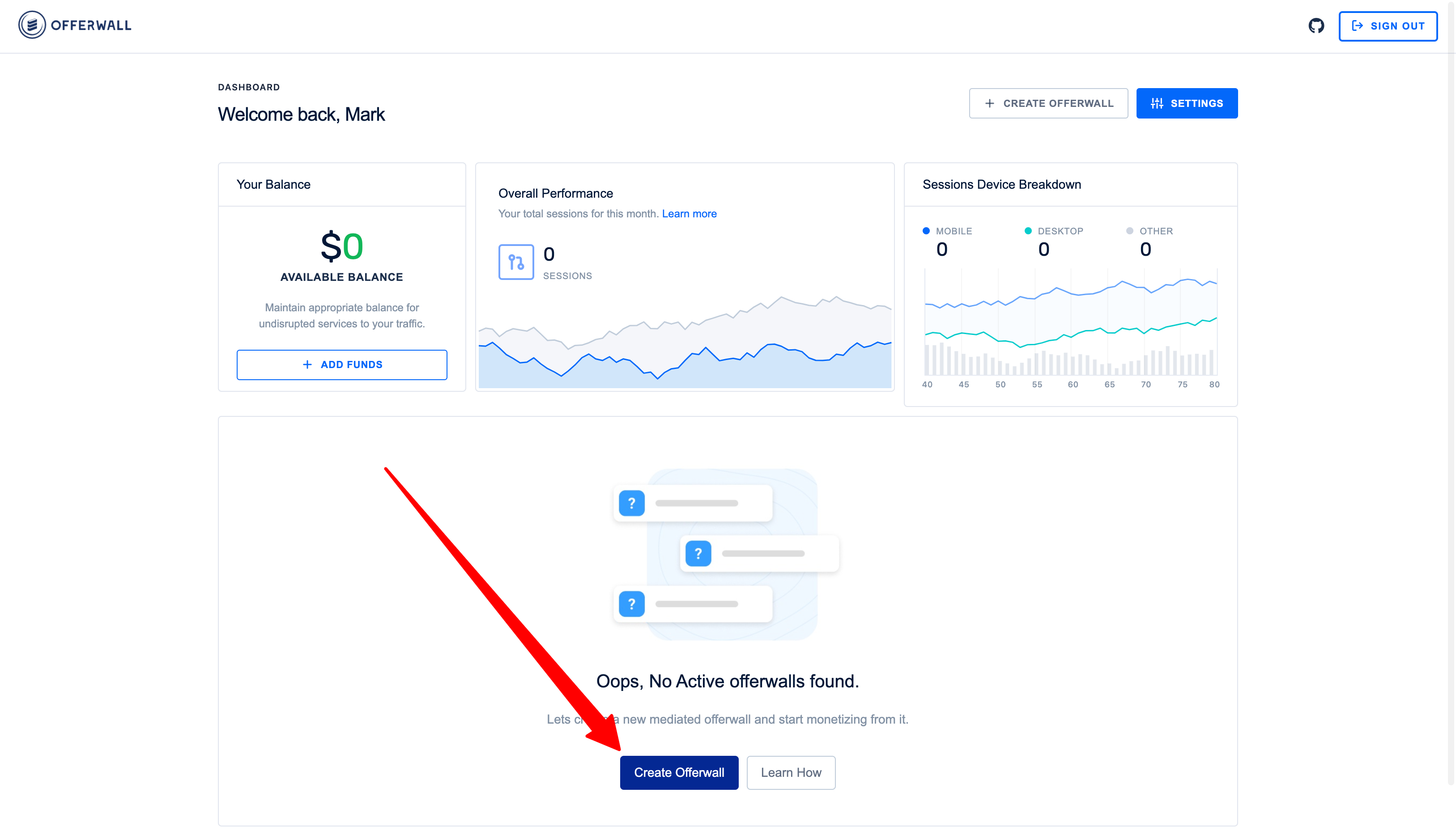
2. Click on `Create Offerwall` button to get started
### Getting OfferwallInc Ids
To Intergrate OGADS offerwall, you’ll need the following Ids from OfferwallInc :
* Wall Id
* Points Ratio
As Ogads does not have an offerwall, we are using offerwallinc.com mediation technology to integrate ogads offers
Please follow the below steps to get the required Ids
1. Login into your ***[OfferwallInc Dashboard](https://offerwallinc.com/dashboard/)***
2. Click on `Create Offerwall` button to get started
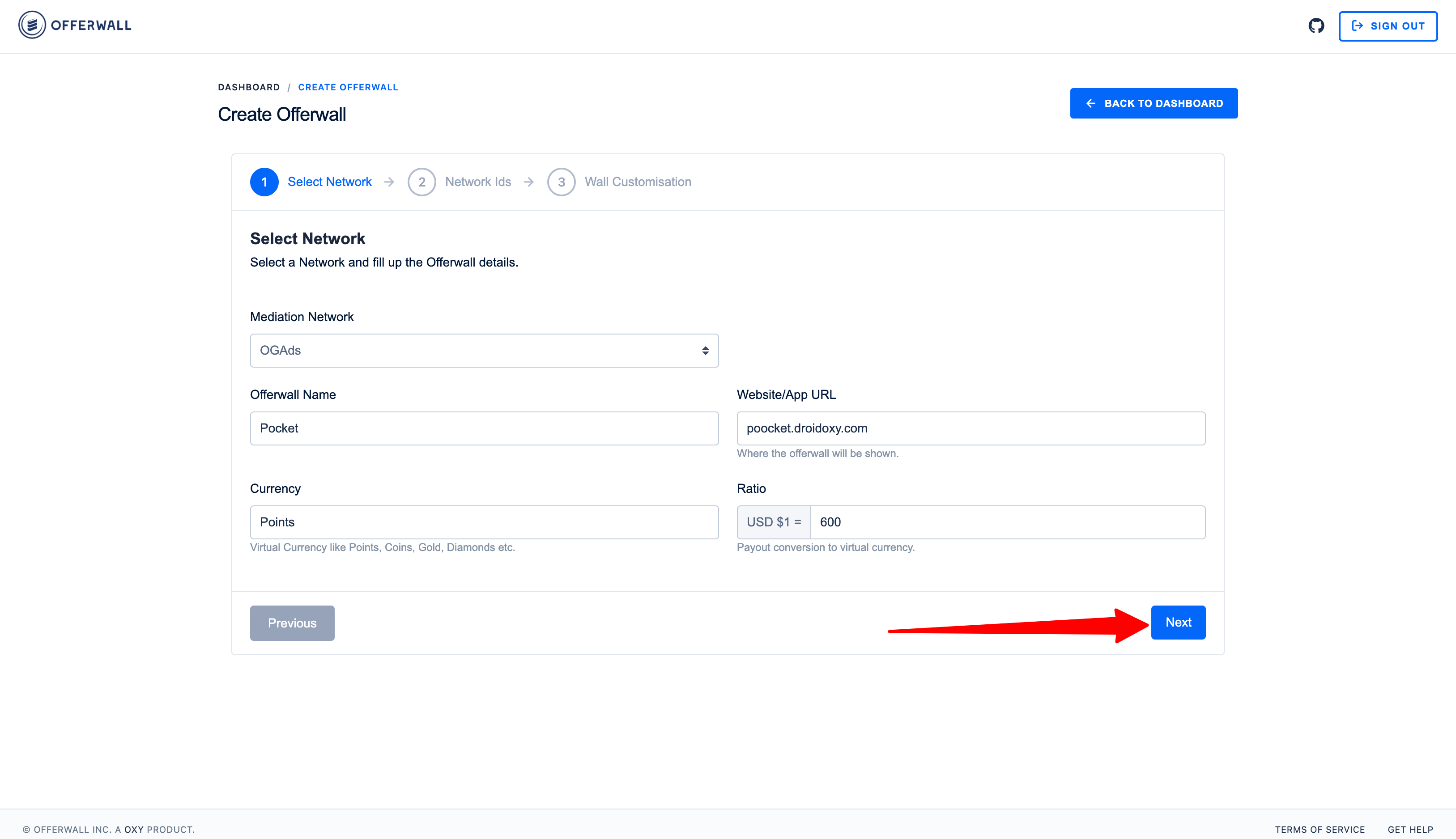
 3. Enter your website and other details and click **Next**
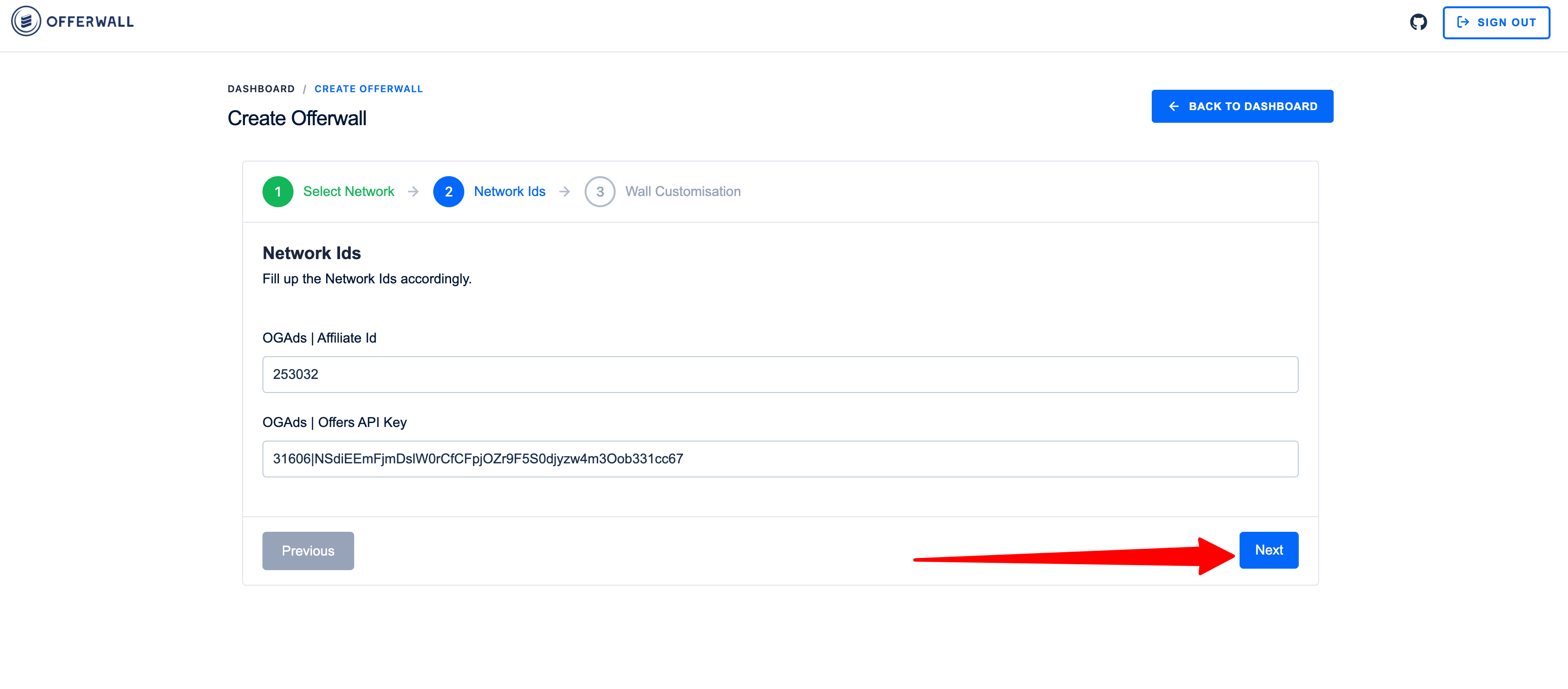
 4. Enter your OGADS `Aff Id` and `API KEY` and click **Next**
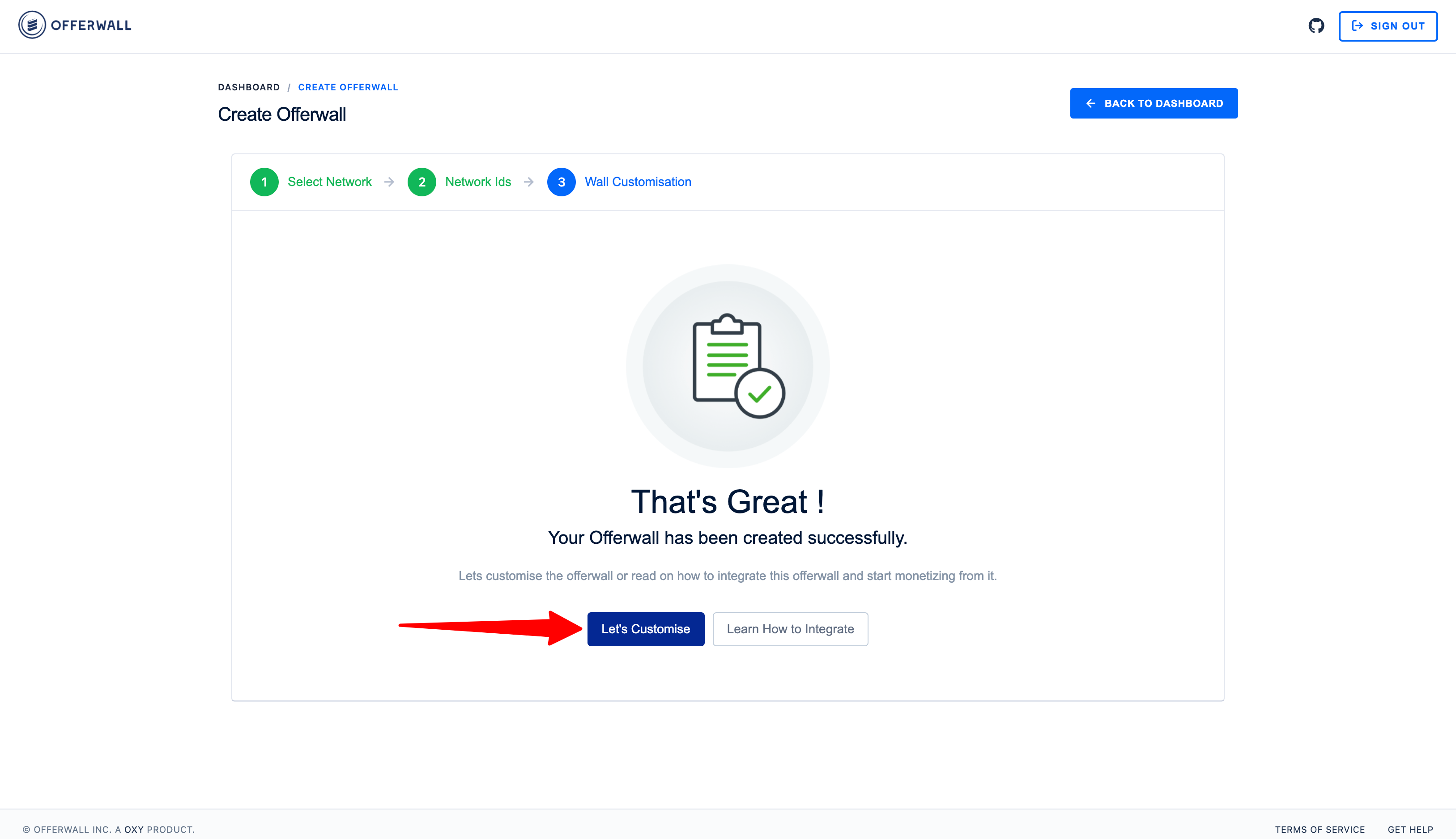
 5. Upon offerwall creation, click on the `Let's Customize` button
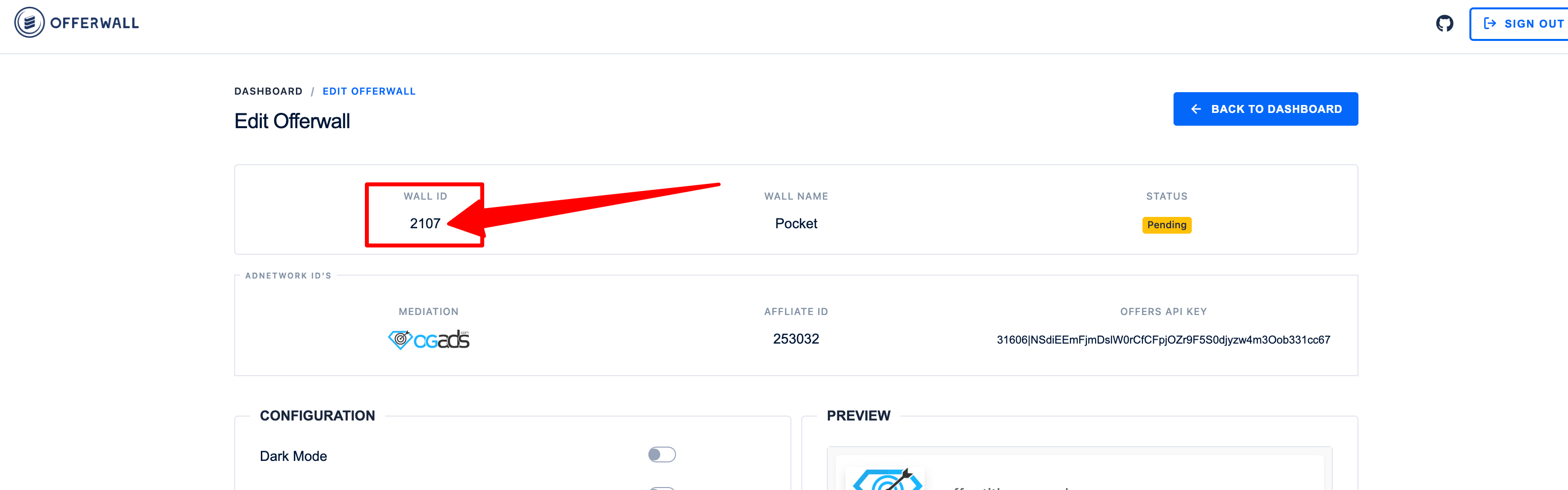
 6. Finally, Copy the `WALL ID`
 ## Integrating Offerwall
1. Login to Admin Interface (Pocket Script instance)
2. Navigate to `Offerwalls -> All Offerwalls` on the admin sidebar
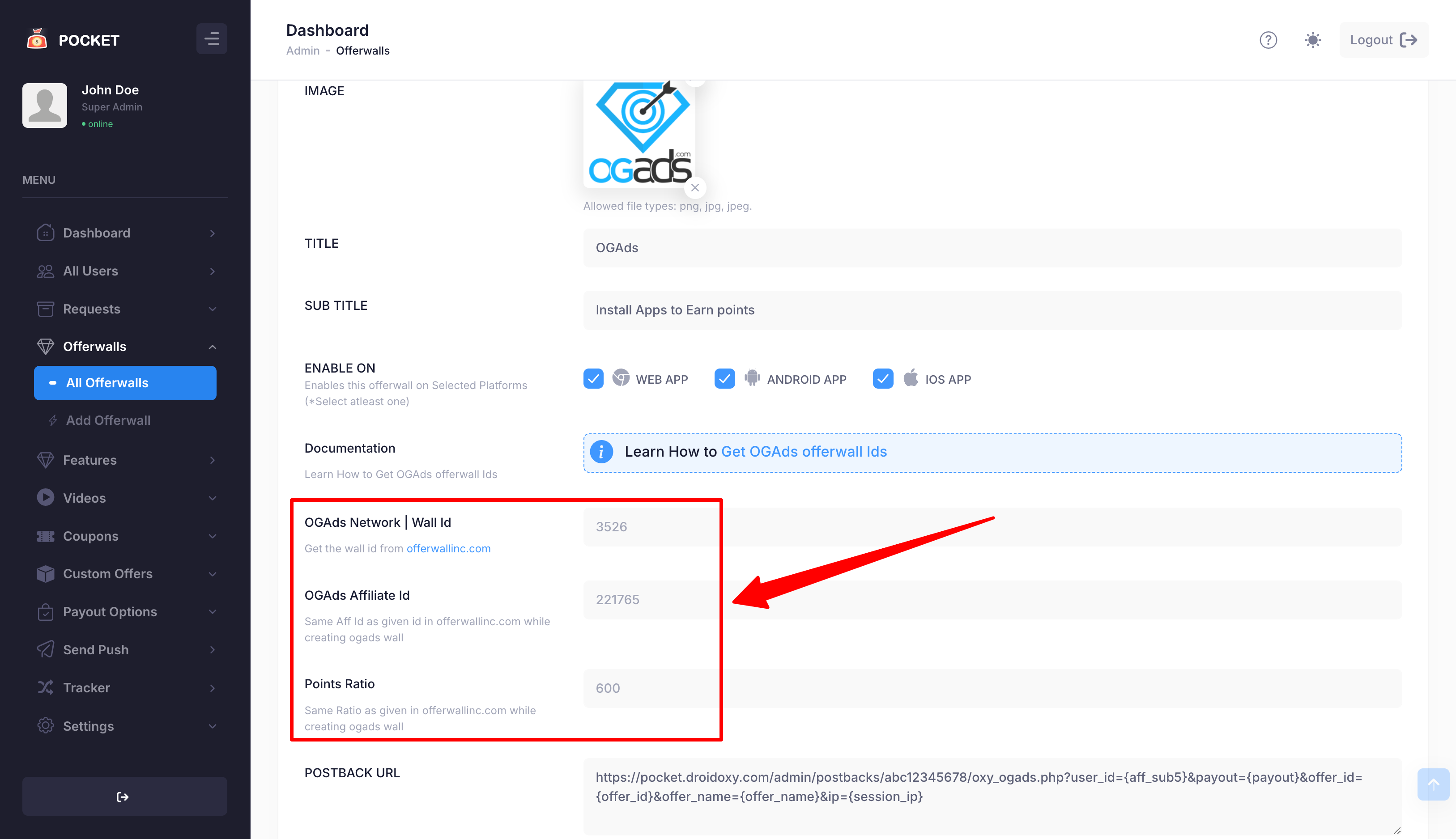
3. Select and Edit OGAds Offerwall and scroll down to Id's Section
4. Paste the copied *offerwallinc's* `Wall Id`, *OGADS's* `Affiliate Id` and `Points Ratio` exactly same as given in *offerwallinc.com* and click on the **Save Changes** button to complete the integration
## Integrating Offerwall
1. Login to Admin Interface (Pocket Script instance)
2. Navigate to `Offerwalls -> All Offerwalls` on the admin sidebar
3. Select and Edit OGAds Offerwall and scroll down to Id's Section
4. Paste the copied *offerwallinc's* `Wall Id`, *OGADS's* `Affiliate Id` and `Points Ratio` exactly same as given in *offerwallinc.com* and click on the **Save Changes** button to complete the integration
 ## Postback Setup
Follow the below steps to seup postbacks on the OGADS platform
1. Login to your ***OGADS Dashboard***
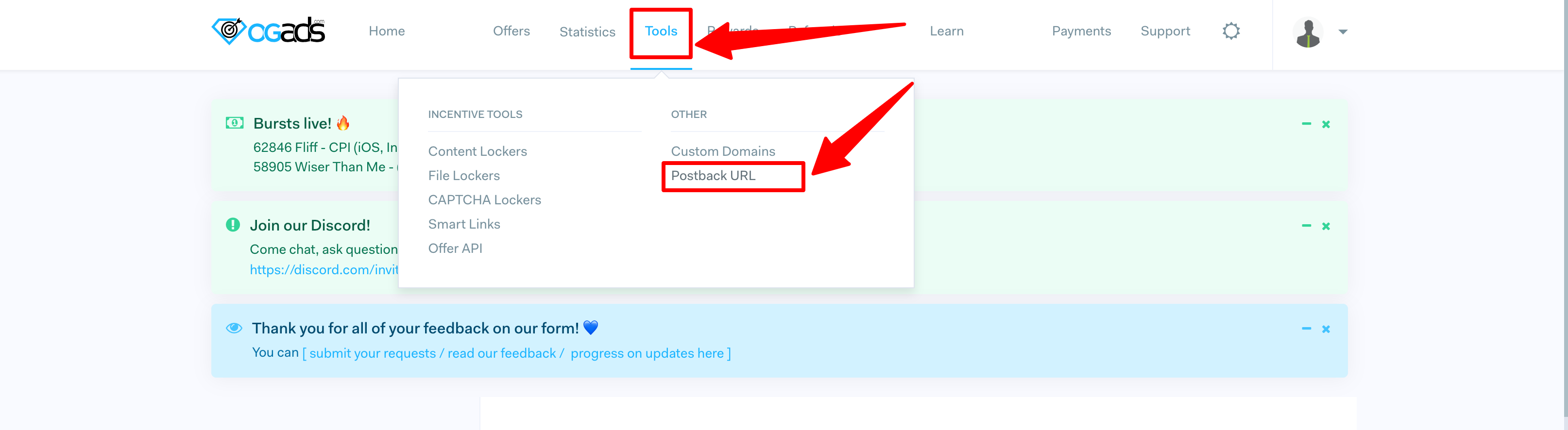
2. Go to `Tools -> Postback URL` on the top menu
## Postback Setup
Follow the below steps to seup postbacks on the OGADS platform
1. Login to your ***OGADS Dashboard***
2. Go to `Tools -> Postback URL` on the top menu
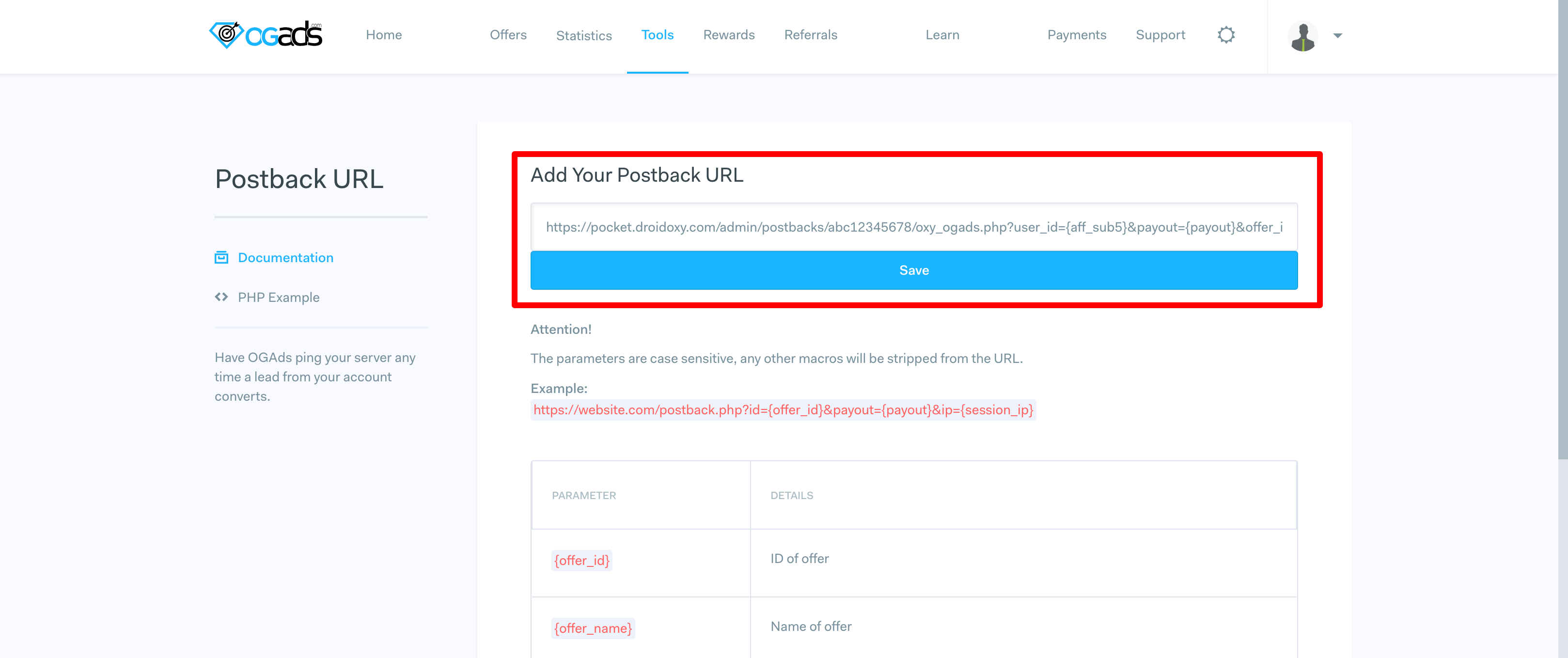
 3. Enter the copied `Postback URL` form the pocket admin Interface and save
 That's it!
## Need Help?
If you need any help or assistance, we're here for you! Please [reach out to our support team](https://droidoxy.com/support/)
That's it!
## Need Help?
If you need any help or assistance, we're here for you! Please [reach out to our support team](https://droidoxy.com/support/)